Java Date and Calendar Class.

Get the Current Date:

Date today = new Date();
System.out.println(“Current date: “ + today);
OUTPUT:
date: Sat May 04 02:29:59 IST 2019

Difference between dates:

Date currentTime = new Date(); Thread.sleep(3000); //Waits for 3 seconds. Date newTime = new Date();
//diferrence in ms. long msDelay = newTime.getTime() currentTime.getTime();

Check Whether Time Interval has Passed:

public static void main(String[] args) throws Exception { Date startTime = new Date(); long deadLine = startTime.getTime() + 3000; // +3 seconds
Date deadLineDate = new Date(deadLine); Date currentTime = new Date();
int secondsCount = 0;
while(!currentTime.after(deadLineDate))// Check whether currentTime is after deadLineDate {
Thread.sleep(1000); // Sleep for 1 sec.
secondsCount++;
System.out.println(secondsCount + ” seconds have passed.”);
currentTime = new Date();
}
System.out.println(“Reached DeadLine!”);}

Output:
1 seconds have passed. 2 seconds have passed. 3 seconds have passed. Reached DeadLine!

Using getTime()
public class Main { public static void main(String[] args) {


Date startTime = new Date();

long deadLine = startTime.getTime() + 3000; // +3 seconds
Date deadLineDate = new Date(deadLine); Date currentTime = new Date();
int secondsCount = 0;
while(currentTime.getTime() < deadLineDate.getTime())// Check whether currentTime is after deadLineDate {
Thread.sleep(1000); // Sleep for 1 sec.
secondsCount++;
System.out.println(secondsCount + ” seconds have passed.”);
currentTime = new Date();
}
System.out.println(“Reached DeadLine!”);

}}

before()
equals()
also work with same syntax as after()

Various get and set methods:

get methods
Date currentTime = new Date();int hours = currentTime.getHours(); // hours passed since midnight. 
int mins = currentTime.getMinutes(); // hours passed since midnight.int secs = currentTime.getSeconds(); // seconds passed since midnight.

set methods
Date yearStartTime = new Date(); 
yearStartTime.setHours(0); 
yearStartTime.setMinutes(0); 
yearStartTime.setSeconds(0); 
yearStartTime.setDate(1); // First day of month
yearStartTime.setMonth(0); // January (months are indexed from 0 to 11)

Calendar class:

Calendar calendar = new GregorianCalendar(2017, 0 , 25);
GregorianCalendar calendar = new GregorianCalendar(2017, Calendar.JANUARY , 25);

set the time 10:30:15 1 Jan 2019

public static void main(String[] args) { Calendar calendar = new GregorianCalendar(); calendar.set(Calendar.YEAR, 2019); calendar.set(Calendar.MONTH, 0); calendar.set(Calendar.DAY_OF_MONTH, 1); calendar.set(Calendar.HOUR_OF_DAY, 10); calendar.set(Calendar.MINUTE, 30); calendar.set(Calendar.SECOND, 15); System.out.println(calendar.getTime());}

Output:

Tue Jan 01 10:30:15 IST 2019
—————————————————————-

public static void main(String[] args) { Calendar calendar = new GregorianCalendar(2019, Calendar.JANUARY , 1); calendar.set(Calendar.HOUR, 10); calendar.set(Calendar.MINUTE, 30); calendar.set(Calendar.SECOND, 15); calendar.add(Calendar.MONTH, 2); // Date will automatically adjust into 2018. System.out.println(calendar.getTime());}

output:
Thu Nov 01 10:30:15 IST 2018
——————————————————————
roll() : This method will make change only in particular part, In this example
only Month will be reduced to Nov but years and other time will not be changed.

public static void main(String[] args) { Calendar calendar = new GregorianCalendar(2019, Calendar.JANUARY , 1); calendar.set(Calendar.HOUR, 10); calendar.set(Calendar.MINUTE, 30); calendar.set(Calendar.SECOND, 15); calendar.roll(Calendar.MONTH, 2); // Date will automatically adjust into 2018. System.out.println(calendar.getTime());}
Output:
Fri Nov 01 10:30:15 IST 2019
——————————————————————

get and set:

calendar.set(Calendar.HOUR, 10);calendar.set(Calendar.MINUTE, 30);calendar.set(Calendar.SECOND, 15); System.out.println(“Year: “ + calendar.get(Calendar.YEAR));System.out.println(“Month: “ + calendar.get(Calendar.MONTH));
——————————————————————-

date format:

SimpleDateFormat dateFormat = new SimpleDateFormat(“EEEE, MMMM d, yyyy”);
Calendar calendar = new GregorianCalendar(2019, Calendar.JANUARY , 1);
System.out.println(dateFormat.format(calendar.getTime()));

output:
Tuesday, January 1, 2019

Difference of days between two dates:

long diff_ms = date1.getTime() – date2.getTime();
days = diff_ms / (24 * 60 * 60 * 1000);

Java Collections

Interface Class/implementation Description
List  ArrayList  List
 LinkedList  List
 Vector  Vector
 Stack  Stack
 Set    HashSet  Set
 TreeSet  Set
 SortedSet  Sorted set
Map  HashMap Map/dictionary
 TreeMap  Map/dictionary
 SortedMap  Sorted dictionary
 Hashtable  Hash-table


Declaration Syntax:

List<String> list = new ArrayList<String>();
Set<String> set = new HashSet<String>();
Map<String, String> map = new HashMap<String, String>();

ADD Elements Syntax:

list.add(“techBuddha”);
set.add(“techBuddha”);
map.put(“key”, “techBuddha”);

Traversing Collection Syntax:

Iterator<String> iterator = list.iterator();while (iterator.hasNext()) {
String text = iterator.next(); System.out.println(text);}
—————————————————-
Iterator<String> iterator = set.iterator();
while (iterator.hasNext()) { String text = iterator.next(); System.out.println(text);}
——————————————————
Iterator<Map.Entry<String, String>> iterator = map.entrySet().iterator();while (iterator.hasNext()){ Map.Entry<String, String> pair = iterator.next(); String key = pair.getKey(); String value = pair.getValue(); System.out.println(key + “:” + value);
}
—————————————————–

Traversing Collection with ShortHand Fast For Loop:

for (String text : list) { System.out.println(text); }
——————————————————-
for (String text : set) { System.out.println(text); }
——————————————————-
for (Map.Entry<String, String> pair : map.entrySet()){ String key = pair.getKey(); String value = pair.getValue(); System.out.println(key + “:” + value);}
——————————————————-

Methods for Set:

Operation Method
Add element(s) add(), addAll()
Remove element(s) remove(), removeAll()
Check for the presence of element(s) contains(), containsAll()


Methods for Map:
Operation Method
Get a set of all pairs entrySet()
Get a set of all keys keySet()
Get a set of all values values()
Add a pair put(key, value)
Get the value for the specified key get(key)
Check whether the specified key is present containsKey(key)
Check whether the specified value is present containsValue(value)
Check whether the Map is empty isEmpty()
Clear the Map clear()
Remove the value for the specified key remove(key)

Collection Methods:

ArrayList<Integer> list = new ArrayList<Integer>();

sort() : Collection.sort(list);
max() : Collection.max(list);
min() : Collection.min(list);
reverse() : Collection.reverse(list);
shuffle() : Collection.shuffle(list);
swap() : Collection.swap(list, i, j);


unmodifiableList() : creates immutable arrayList from an array.
List<String> weekEndDays = Collections.unmodifiableList(new ArrayList<>(Arrays.asList(saturday, sunday)));

disjoint() : It checks whether two collections intersect, returns false if intersection is non null otherwise true.

ArrayList<String> list1 = new ArrayList<>(Arrays.asList(sunday, monday, tuesday));ArrayList<String> list2 = new ArrayList<>(Arrays.asList(saturday, sunday));
Collection.disjoint(list1, list2); // will return false, sunday is common.

Collection Initialization:

public static Set join(Set a, Set b)
{
/*Double braces initialization*/
    return new HashSet() {{ addAll(a); addAll(b); }}
}

SSD vs HDD

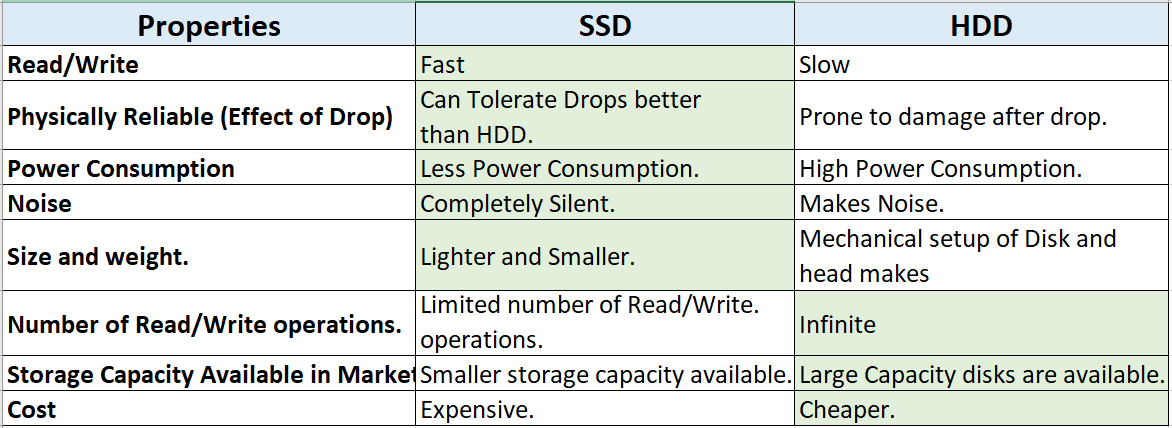
As we know storage technology has been changing since inception of computer industry. Some of them replaced older technology because of their better properties or price. Hard Disk Drive was a significant invention because with the help of its circular geometry it simulates Random Access even it has sequential storage inside it. Few years ago SSD’s sequential speed was more or less equal to HDD but now sequential speed also improved. Provided that SSD is faster than HDD in both type of access random or sequential still its very hard to decide which one to choose.  This Article will help you to make a wise decision according to your requirements.

Hard Disk Drive

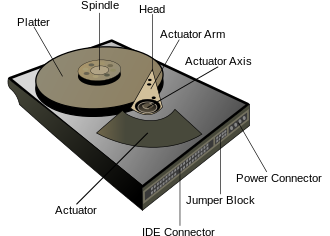
HDD has a circular disk which is made up of magnetic field sensitive film, and a magnetic head attached with arm. Speed of writing and reading depends on the motor attached to the disk for rotation and time taken to positioning the magnetic head at desirable place on circular disk. In sequential read and write operation head does not need to move once it is located on desirable place so in this case only rotation per minute (RPM) of motor will decide the speed of read/write operations. Re positioning mechanism has to deal with inertia and accuracy of position so its the slowest sub operation in hard disks. Physical movements has to deal with physics’s law so even after optimization there is a upper limit which cant be crossed with any technology.

Solid State Drive

These drives uses non volatile integrated circuits to store data. There is no need of physical movement in such drives so these are much faster than HDD especially for random access.


Comparison SSD vs HDD

Analysis With RAM size and SSD & HDD.

 When you start anything in your computer it will be loaded from secondary storage to main memory Partially. So if RAM size is small and software or game requires lot of RAM then there will so many Page Faults (Memory Transfer from secondary storage to RAM) it will heavily downgrade the overall performance. This is applicable only for big games and software like Virtual Box etc or in case of many things running simultaneously. Time taken for serving page faults is dependent on the secondary memory HDD or SSD. 

SSD are faster but real bottleneck is RAM size because to improve overall performance we need to reduce the number of page faults instead of  improving page fault service time. There is very huge gap in speed of RAM and secondary memory so improving secondary memory speed by replacing HDD with SSD is not going to help in case of less RAM size.

First time loading or boot is always will be dependent on secondary memory speed even you have infinite RAM size, because you can not store anything in RAM permanently.
1. Less RAM + HDD: will suffer from page faults, will have poor performance.
2. Less RAM + SSD: nothing is going to change, speed of secondary can not overcome shortage of RAM because of  very huge difference between operating speed of primary and secondary memory.
3. Enough RAM size + HDD: will only suffer significantly at the time of first time loading. Recommended for budget buyers.
4. Enough RAM size + SSD: This combination will give best speed because of less page faults and Fast page fault handling. Recommended for those who need speed but do not need much space in system.
5. Enough RAM size + small SSD + HDD. This combination picks best feature from all, best speed and big space. Recommended for Gamers and Graphic and Video Editors.

Conclusion

If you want to upgrade your system with SSD to improve the speed. Please first make sure that you have sufficient RAM according to your requirements.
You can opt for smaller SSD to replace HDD in your system with one external HDD for large storage if you want to spend wisely. You can not install both drives inside your laptop and hybrid drives are not popular because of complications. So either go for SSD + external HDD or buy new laptop with SSD + HDD.
If you want speed and do not need large storage space, replace HDD with SSD. 
If money does not concerns you in making the choice then obviously go for SSDs but still for large external storage you have to purchase HDD. 
For normal general user SSD is luxury not necessity so identify your requirements and then make decision.  

Which Storage suits you.

SSDs
1. Gamer
Fast Game loading, Fast Game reloading in case of player dies or Fast travel in open world games.
2. Graphic Designer, Video editor.
3. Professionals who prefer speed over price and space size.
4. Music professionals who cant tolerate any kind of noise while recording.
5. Who hates slow boot up of Operating System. 

HDDs

1. Gamer: Mandatory requirement to store bulky games collection.

2. Graphic Designer, Video editor: Required to store bulky video collection.
3. General User.
4. Budget Buyer.

Advice

If you play games regularly and use fast travel in open world games, or dies often, SSD will save your more than half of loading time.

Hashing

Hashing

hashing

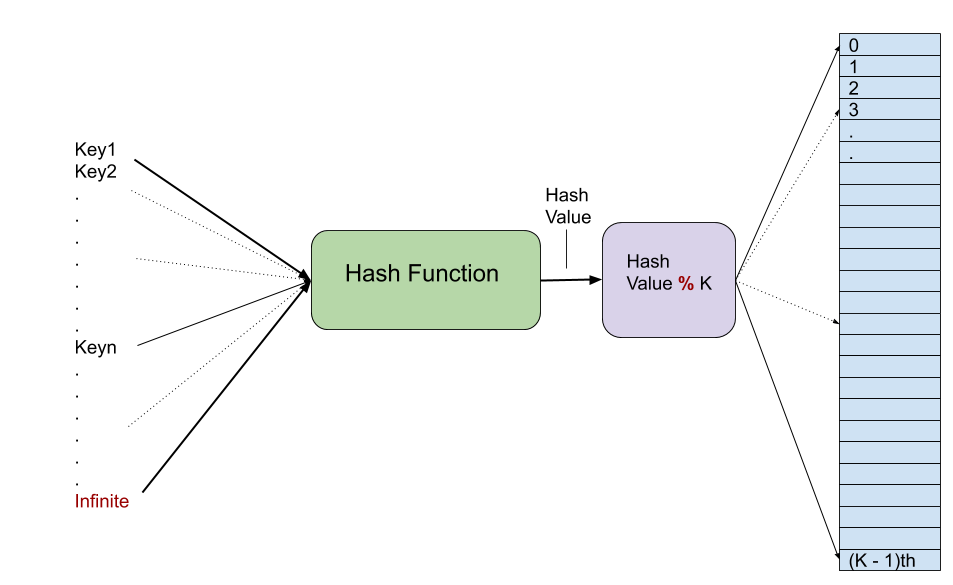
Hashing is a technique to map things from one range to another range by using a hash function which process the input key and returns an hash value. Modulus operation can be used on hash value to get index in fixed range. Key value pair is stored at this returned index. Pigeon hole rule says if pigeons are more than the holes then some pigeon have to share holes. So whenever we try to map a larger range of keys into a fixed size hash array then modulus operation may return same index for two different hash values and hash function also can generate same hash value for two different keys that we call hash collision. In general hash function does not have any fixed output range so hash function tries to minimize the collision with better algorithm but for storing key-value pairs we have to use fixed size array. Second hash function modulus is used to map hash values generated by hash function to fixed range so collisions are unavoidable. Hash function which generates uniform hash values should be used to minimize collisions. 

Collision Handling:
1) Separate Chaining
2) Open Addressing  

Separate Chaining 

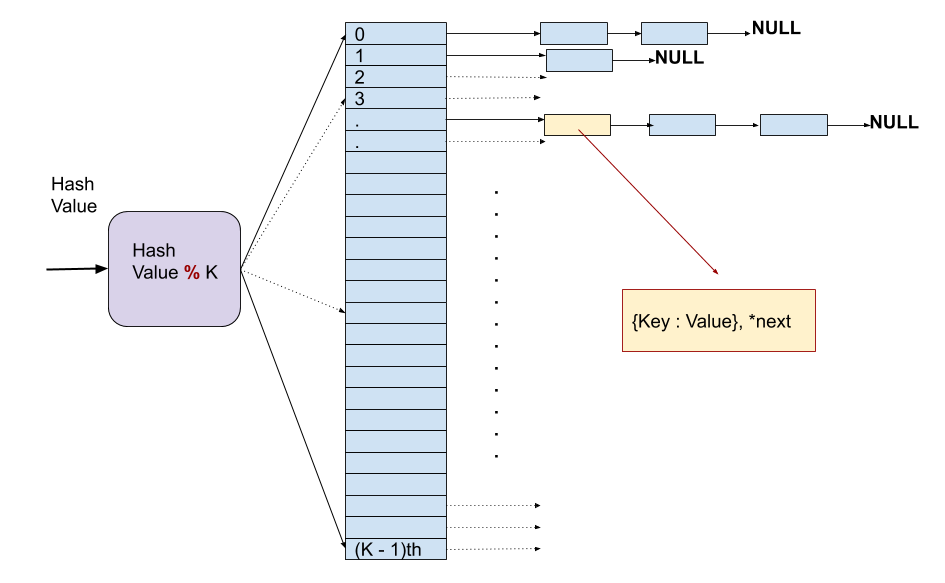
9a1f6-chaining                                                                                              

Separate chaining is very simple approach to deal with collisions just keep a linked list at each index and in case of collision add one more node. For accessing stored value first hash function and modulus will give index then search through whole list till key matches with the stored nodes or list ends.

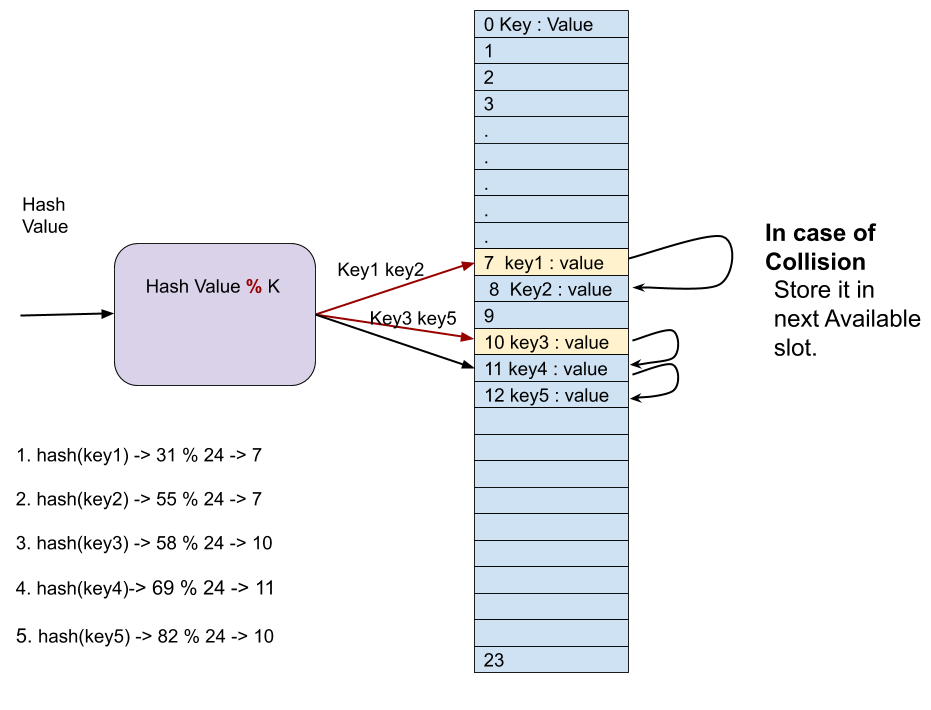
Open Addressing                                                                                                  b2f61-openaddressing2b252812529                    
In open addressing method key and value pairs are stored in table itself. In case of collision we search for next empty slot to put the key value pair. This approach have limitation that we can not insert key if table is full, to insert more keys after getting table full a new big table can be allocated and old table can be copied to new bigger table. Searching has same approach as insert first go the index given by [hashValue % k] then keep traversing more slots till key matches or one round of table is complete.
There are many type of open addressing strategies:
a) Linear Probing
b) Quadratic Probing.

  Seperate Chaining Open Addressing
1. Chaining is Simple and easy to implement. Open Addressing requires more traversal of list during insert.
2. In chaining, Hash table never fills up, we can always add more elements to chain. In open addressing, table may become full.
3. Chaining is Less sensitive to the hash function or load factors. Open addressing requires extra care for to avoid clustering and load factor.
4. Chaining is mostly used when it is unknown how many and how frequently keys may be inserted or deleted. Open addressing is used when the frequency and number of keys is known.
5. Cache performance of chaining is not good as keys are stored using linked list. Open addressing provides better cache performance as everything is stored in the same table.
6. Wastage of Space (Some Parts of hash table in chaining are never used). In Open addressing, a slot can be used even if an input doesn’t map to it.
7. Chaining uses extra space for links. No links in Open addressing

a) Linear Probing                                                                                                                     
b) Quadratic Probing                                                                                                         
c) Double Hash                                                                                                                       

Performance Analysis

work in progress.