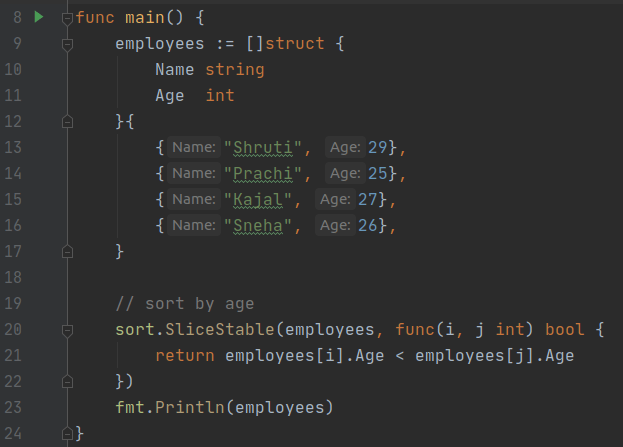
Output:
[{Prachi 25} {Sneha 26} {Kajal 27} {Shruti 29}]

sort.Slice() can be used in the place of sort.SliceStable().
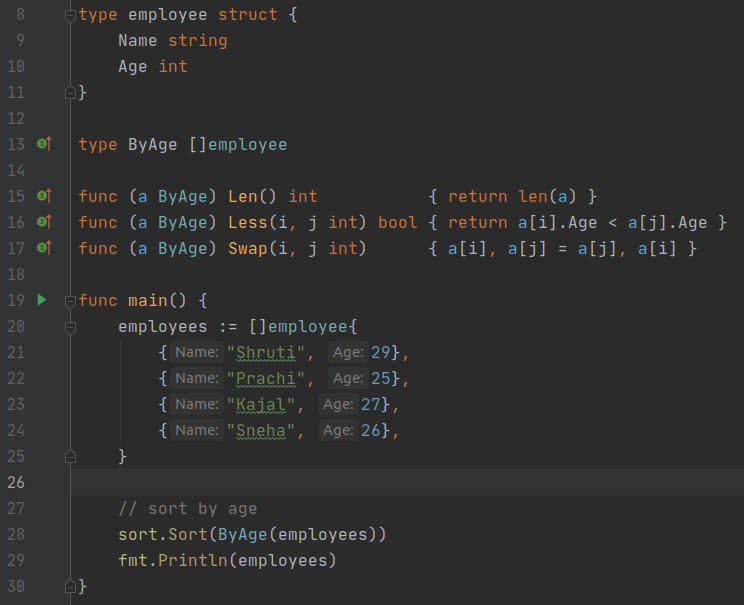
Output:
[{Prachi 25} {Sneha 26} {Kajal 27} {Shruti 29}]

You are not your job, you're not how much money you have in the bank. You are not the car you drive. You're not the contents of your wallet.
Output:
[{Prachi 25} {Sneha 26} {Kajal 27} {Shruti 29}]
sort.Slice() can be used in the place of sort.SliceStable().
Output:
[{Prachi 25} {Sneha 26} {Kajal 27} {Shruti 29}]
/**
 * container_of - cast a member of a structure out to the containing
 * struct
 * @ptr: the pointer to the member.
 * @type: the type of the container struct this is embedded in.
 * @member: the name of the member within the struct.
 *
 */

Simple Version:

#define container_of(ptr, type, member) ({ \
 (type *)( (char *)(ptr) - offsetof(type,member) );})


Linux Version with type safety:

#define container_of(ptr, type, member) ({ \
 const typeof( ((type *)0)->member ) *__mptr = (ptr); \
(type *)( (char *)__mptr - offsetof(type,member) );})
Lets first analyse simple version with an Example:
struct student {
    char name[20];
    int roll_no;
    int course_code;
    int marks;
    struct list_head student_list;
};
struct student stu;
uint32_t *pMarks = &stu.marks;
struct student *pStu = container_of(pMarks, struct student, marks);
if (pStu == &stu) // True
Can you get address of stu variable using pMarks ?
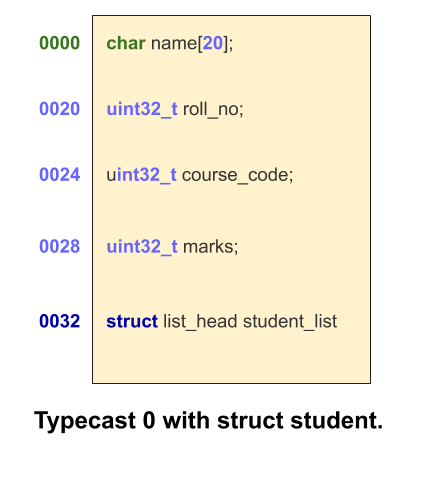
Yes, Just subtract distance between start of struct to marks variable(20 + 4 + 4) from
pMarks : pMarks – (20 + 4 + 4) is equal to &stu
if we ignore padding and alignment. This explains the subtraction operation in
(type *)( (char *)(ptr) - offsetof(type,member) .
So now we have to find a way to calculate the offset of a variable in struct.
You must have known that every process has its own address space and starting address of
this address space starts with 0.
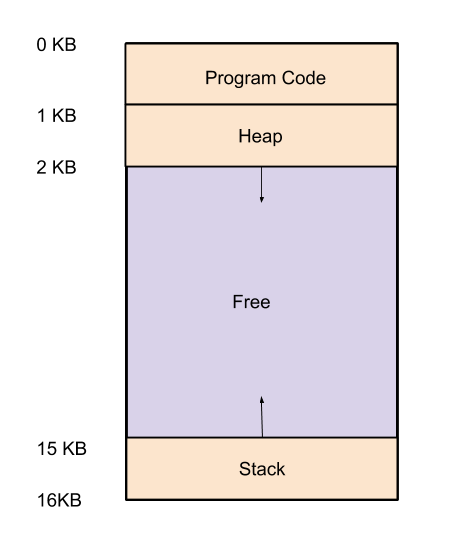 |
| Process Address Space Example. |
As you know we can type cast any address without caring what is stored inside. For example.
char buffer[20];
struct student * pStu = (struct student *)buffer; //valid
if base address of buffer is starting with 0x0000 then the address of marks will be equal to (0 + offset) => offset. so &marks is equal to offset of marks in the struct student. But no buffer can start with 0 address that is reserved for code. But we can typecast constants also same as buffer so there is no problem in typecasting 0 itself.
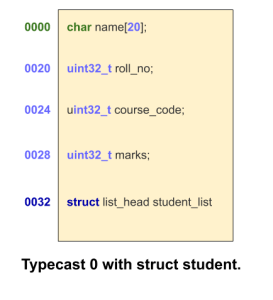
This offsetof macro does same thing as we discussed to calculate offset of a member variable in
 struct.
#define offsetof(TYPE, MEMBER) ((size_t) &((TYPE *)0)->MEMBER)
offsetof(struct student, marks) => &(((size_t)(struct student *)0)->marks)
why do we need an extra complicated line if this simple version works fine. Lets first discuss about compilation warning about incompatible pointer assignment.
int a;
char *str = &a; //This line will give compilation warning.
typeof()
int a;
typeof(a) b = 10; //Equivalent to int b = 10;
#define container_of(ptr, type, member) ({ \
            const typeof( ((type *)0)->member ) *__mptr = (ptr);
(type *)( (char *)__mptr - offsetof(type,member) );})
conainer_of(pMarks, struct student, marks)
=>
const typeof(((struct student *)0)->marks) *__mptr = (pMarks);
(struct student *) ((char *) __mtr - offsetof(struct student, marks));
=>
const struct student * __mptr = (pMarks);
(struct student *) ((char *) __mtr - offsetof(struct student, marks));
If you have doubt about there two lines in macro with semicolons so which one will be
returned.
int a = ({int x = 4; 5;});
printf("a == %d", a);
Output: a == 5
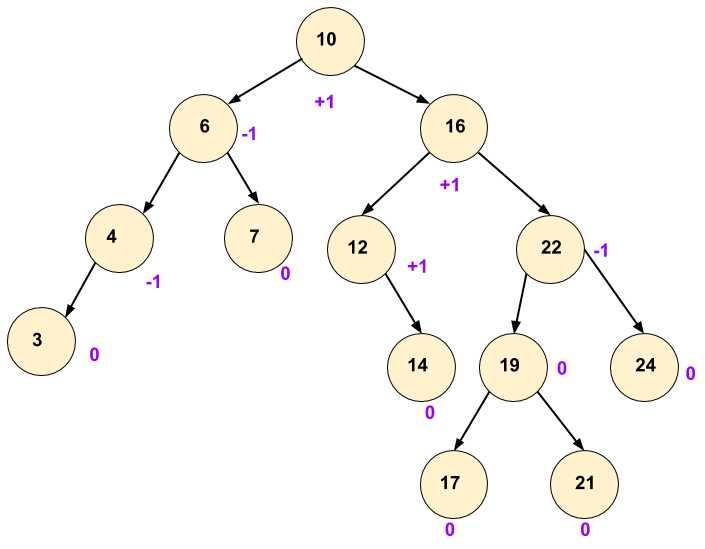
| This is an AVL tree, each node is satisfying balance factor rule. |
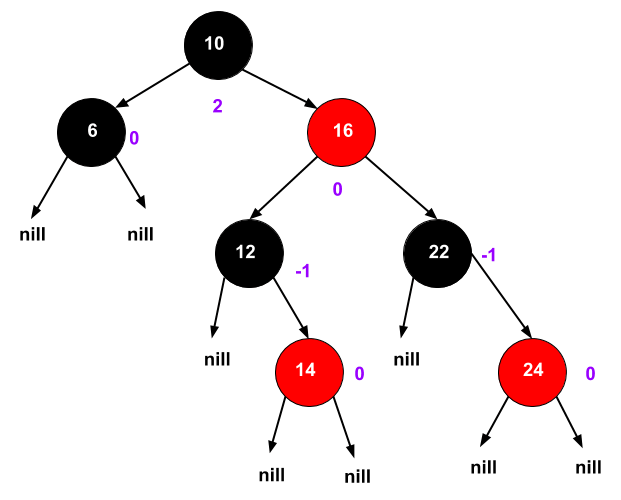
| This is Red Black Tree with less strict Balancing than AVL tree. |
| Operations | AVL Tree | Red Black Tree |
|---|---|---|
| Frequent Insert, Delete | It suffers from overhead of rotations as compared to Red Black Tree. | Better |
| Frequent Search | Better | It is not as balanced as AVL so searches are little bit slower. |
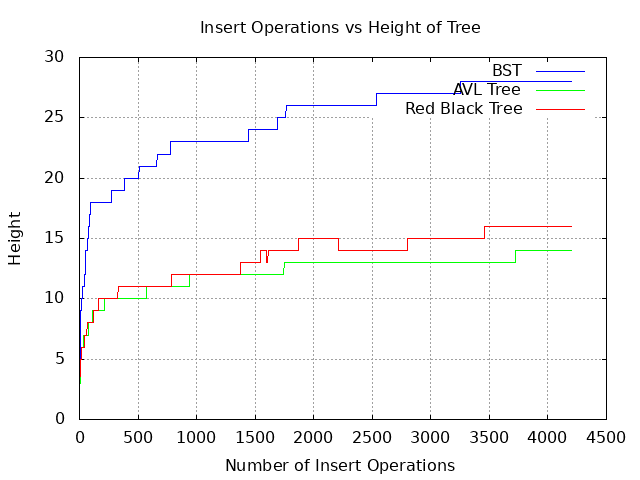
Asymptotic complexity is same for both trees.
insert O(logn)
delete O(logn)
search O(logn)
rotations O(1) internal operation to preserve balancing.
Red Black Tree Properties:
1. Every node is either red or black.
2. The root is black.
3. Every leaf (NIL) is black.
4. No Red–Red parent child relationship. In other words If a node is red, then both its children are black.
5. For each node, all paths from the node to descendant leaves contain the same number of black nodes.
Operations
User Operations:
Search(key) Its same as all other binary search tree. So we will not discuss search() here.
Insert(key)
Delete(key)
Internal Operations:
Recoloring(node x)
LeftRotate(node x)
RightRotate(node x)
LeftRotate(node x)
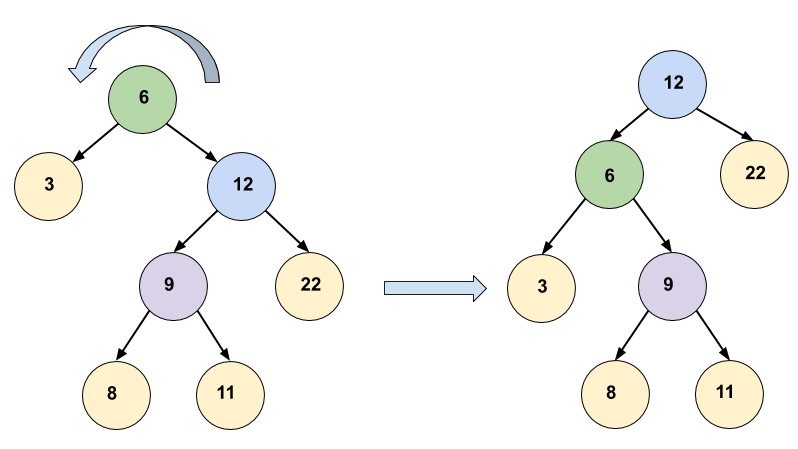
Pseudo Code:
LeftRotate(node x)
1   y = right[x]                   //Set y
2   right[x] = left[y]           //Turn y's left subtree into x's right subtree.
3   if left[y] != NIL:
4        then parent[left[y]] = x
5   parent[y] = parent[x]     // Link x's parent to y.
6   if parent[x] == NIL:
7        then root = y
8   else if x == left[parent[x]]
9        then left[parent[x]] = y
10 else
11     right[parent[x]] = y
11 left[y] = x                       //Put x on y's left.
12 parent[x] = y
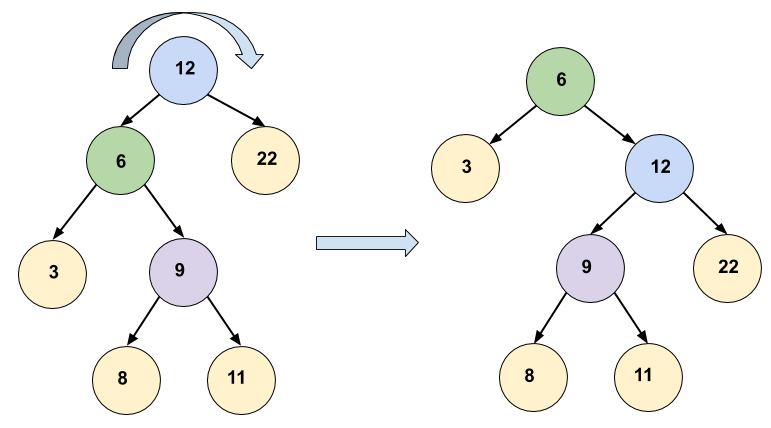
Pseudo Code:
RightRotate(node x)
1   y = left[x]                    //Set y
2   left[x] = right[y]            //Turn y's right subtree into x's right subtree.
3   if right[y] != NIL:
4        then parent[right[y]] = x
5   parent[y] = parent[x]     // Link x's parent to y.
6   if parent[x] == NIL:
7        then root = y
8   else if x == left[parent[x]]
9        then left[parent[x]] = y
10 else
11     right[parent[x]] = y
11 right[y] = x                    //Put x on y's right.
12 parent[x] = y
Figures:
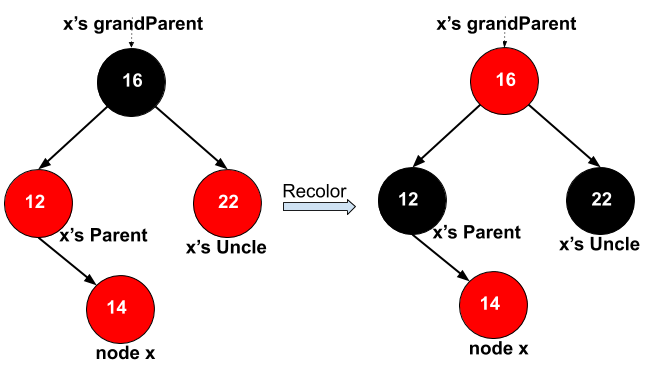
case2: x’s uncle red. => recolor
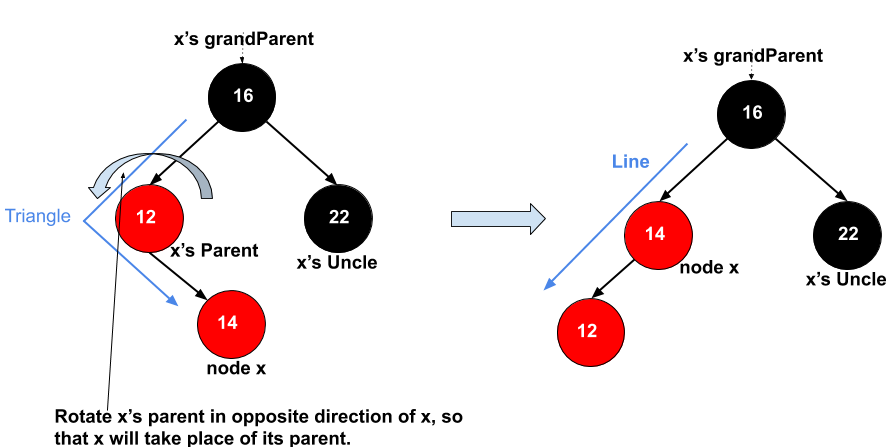
case 3: x’s uncle is black(triangle). => rotate x’s parent
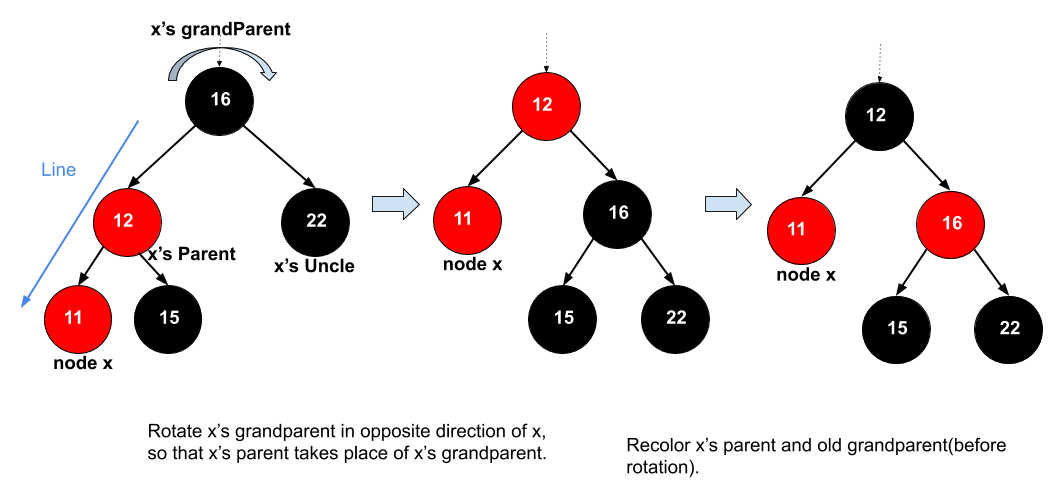
case 4: x’s uncle is black(line). => rotate x’s grandparent and recolor.
Code Link:
https://github.com/abhi1kush/BinarySearchTree/tree/master/src
WORK IN PROGRESS …
ptr
Gnome Sort
Logic of this sorting algo same as insertion sort, array at left hand of current position during sorting
is sorted and if element at current position violating sorted order then swap it with
next element on left side and keep on doing till it reaches its correct place.
In insertion sort we use two loops, but here with simple trick we avoided inner loop.
Here this single loop increments and decrements “i” based on the current element is in expected
order or not, and achieves same functionality and behavior as insertion sort.
Cons: In insertion sort after putting current element at proper place in left side sorted array outer
loop start from where it left, but in gnome there is only one iteration variable so it has to increment
i as many times as it decreased to come back again at position from where i started decreasing.
Pros: Less number of line, easy to remember and easy to write.
So complexity is also same as insertion sort: best case O(n) Worst case: O(n^2).
public class Main {
1    public static void gnomeSort(int[] arr) {
2        for (int i = 1; i < arr.length; ) {
3            if (0 == i || arr[i - 1] <= arr[i]) { //in expected order.
4                i++;
5            } else {
6                //swap
7                int temp = arr[i - 1];
8                arr[i - 1] = arr[i];
9                arr[i] = temp;
10               i--;
11            }
12        }
13    }

    public static void main(String[] args) {
        int[] arr = {4, 6, 3, 7, 89, 2, 4, 12, 34, 90, 100, -1, 0};
        gnomeSort(arr);
        for (int x : arr) {
            System.out.print(" " + x);
        }
    }
}
Output:
-1 0 2 3 4 4 6 7 12 34 89 90 100
log method using stackTrace in Java
A custom log() method can used to print a message with a details like which class which function
called the log at which line number. It is useful for debugging.
  1 public class Main {
  2     public static void func() {
  3         Log.log("\"log msg\"");
  4     }
  5
  6     public static void main(String[] args) {
  7         func();
  8         Log.log("printing log in main");
  9     }
 10 }
 11
 12 class Log {
 13
 14     public static void log(String s) {
 15         StackTraceElement[] stackTrace = Thread.currentThread().getStackTrace();
 16         String className = stackTrace[2].getClassName();
 17         String caller = stackTrace[2].getMethodName();
 18         int lineNo = stackTrace[2].getLineNumber();
 19         System.out.println("[class-name : " + className + "],  [caller-function : "
 20                 + caller + "], [ line-no : "+ lineNo+ "], " + s);
 21     }
 22 }
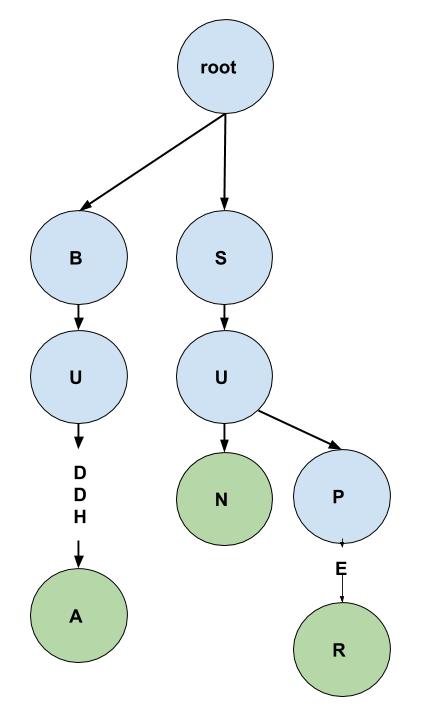 |
| This Trie has Three words, BUDDHA, SUN and SUPER. |
public classtrieNode
{
     trieNode[] childrenArr;
     Boolean isEndOfWord;
     trieNode()
     {
          childrenArr = new trieNode[26];
     }
     //methods ...
}
eg:
Considering Trie represented in Figure.
contains("sun")
  root   if (null != childrenArr[indexOf('s')]) True
   |
   s     if (null != childrenArr[indexOf('u')]) True
   |
   u     if (null != childrenArr[indexOf('n')]) True
   |
   n     if (True == isEndOfWord) True

  return True
contains("song")
root if (null != childrenArr[indexOf('s')]) True
|
s if (null != childrenArr[indexOf('o')]) False
return False This function add child nodes corresponding to the chars in string only if they are present already, if already present keep traversing and if not present add child node corresponding to chars and keep on adding.
eg: Considering Trie represented in Figure.insert("buddy")
root if (null != childrenArr[indexOf('b')]) True
/ \
b s at b node: if (null != childrenArr[indexOf('u')]) True
| .
u . if (null != childrenArr[indexOf('d')]) True
|
d if (null != childrenArr[indexOf('d')]) True
|
d if (null != childrenArr[indexOf('y')]) False
|\
| \ y child is not present so add it.
h y ---added a y child at indexOf('y') with isEndOfWord True
|
a
insert("bud")
root if (null != childrenArr[indexOf('b')]) True
/ \
b s at b node: if (null != childrenArr[indexOf('u')]) True
| .
u . if (null != childrenArr[indexOf('d')]) True
|
d set isEndOfWord TrueIts simple first reach node representing last char of prefix, and then start traversing
all children recursively in other words traverse all paths till leaf nodes. During traversal
isEndOfWord can be used to find all possible words.
                  root
                    / \
                    b  s
                    |  |
                    u  u
                    |  |\
     end of word ---d  n p
                    |    |
                    d    e
                    |\   |
                    h y  r
                    |
                    a

Lets understand expected behavior of delete().

 contains("buddy") True contains("bud") True
 delete("bud")      This will set isEndOfWord False in in b->u->(d).
 contains("bud")    False
 contains("buddy")  True
 delete("buddy")    This will remove y node and free memory of node.
 contains("buddy")  False
 contains("buddy")  False
 contains("buddha") True
 delete("buddha")   It will remove all nodes from b->u->d->d->h->a.
contains("buddha") FalseFirst Scenario: Deleting a word which is a prefix of other existing longer words.
eg: deletion of bud.
In this case we need to set isEndOfWord to Flase only.
Second Scenario: Deleting a word which shares a part of it with other words and one part is not shared by any other words.
eg: deletion of buddy, “y” is not shared with anyone so node “y” will be deleted.
Third Scenario: Deleting a word which does not share any char with other words in trie.
eg: we have deleted bud and buddy now buddha is not shared with any word.
delete(“buddha”) This will delete all nodes b to a.
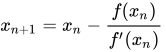
Lets find derivative of our equation.
f ‘(x) = 2x
Simplify the Equation:
Xn+1 = Xn – (Xn^2 – n) / 2Xn
Xn+1 = (2Xn^2 – Xn^2 + n) / 2Xn
Xn+1 = (Xn^2 + n) / 2Xn
Xn+1 = (Xn + n/Xn)/2
take guess value of Xn lets say 1,
and keep iterating to calculate Xn+1
and stop when (Xn+1 – Xn) <= required precision.
Pseudo Code:

float square_root(int n)
{
    float x = 1; //guess value.
    while (true)
    {
        float lastX = x;
        x = (x + n/x) /  2;
        if (abs(x - lastX) <= 0.00001)
        {
            break;
        }
    }
    return x;
}
public class Solution {
    public static double squareRoot(int n) {
        final double precison = 0.0000001;
        final double guess = 1;
        double x = guess;
        double lastX;
        do {
            System.out.println(x);
            lastX = x;
            x = (x + n/x)/2;
        } while ((Math.abs(x - lastX)) > precison);
        return x;
    }

    public static void main(string[] args) {
        System.out.println(squareRoot(2));
    }
}
Output:
1.0
1.5
1.4166666666666665
1.4142156862745097
1.4142135623746899
1.414213562373095
Type * var;
_ Type _ * _ var;
Any _ underscore can be replaced with const in above statement.
below are three valid statements.
const int *ptr; // ptr is a pointer to constant int
int const *ptr; // ptr is a pointer to constant int (misleading but valid statement)
Example #1: Simple declaration
                                  +-----------+
                                  |   +-----+ |
                                  |   | +-+ | |
                                  |   | ^ | | |
                            int const *ptr; | |
                             ^    ^   ^   | | |
                             |    |   +---+ | |
                             |    +---------+ |
                             +----------------+
ptr is an…
ptr is an pointer to constant int.
                                  +--------------+
                                  |   +--------+ |
                                  |   |    +-+ | |
                                  |   |    ^ | | |
                            int   * const ptr; | |
                             ^    ^   ^      | | |
                             |    |   +------+ | |
                             |    +------------+ |
                             +-------------------+
Question we ask ourselves: What is ptr? ptr is an...
ptr is an …
ptr is an constant …
ptr is an constant pointer to …
ptr is an constant pointer to int
Example #3: Simple declaration
                             +-----------+
                                  |   +-----+ |
                                  |   | +-+ | |
                                  |   | ^ | | |
                           const int  *ptr; | |
                             ^    ^   ^   | | |
                             |    |   +---+ | |
                             |    +---------+ |
                             +----------------+
Question we ask ourselves: What is ptr?ptr is an…
- We move in a spiral clockwise direction starting with `ptr’ and we see the end of the line (the `;’), so keep going
ptr is an …
- Continue in a spiral clockwise direction, and the next thing we encounter is the `*’ so, that means we have pointers, so…
ptr is an pointer to…
- Continue in a spiral direction and we see the int so
ptr is an pointer to int …
- Continue in a spiral direction and we see the const
ptr is an pointer to int constant.So ptr is an pointer to constant int also means same thing in English as well as in c.Note: Spiral rule can be applied on any c declaration.
int n = 10, m = 20;
vector<int> v = {7, 5, 16, 8};
vector<int> vec(10); //with initial size 10, vec[i] can be used to insert elements.
vector<int> vec2(10, 0); //intialized with zero.
vector<int> vec3(n);
vector<int> vec4(n, 0);
vector<vector<int>> grid(n, vector<int>(m));     // 2D vector of nxm
vector<vector<int>> grid2(n, vector<int>(m, 0)); //initialized with 0
vector<vector<int>> twoDVector;
Iterators
 vector<int> vec;
 vec.push_back(1);
 cout <<"size: " << vec.size() << " max_size: " << vec.max_size() << " capacity: " << vec.capacity()<<endl;
 vec.push_back(2);
 cout << "size: " << vec.size() << " max_size: " << vec.max_size()<< " capacity: " << vec.capacity() << endl;
 vec.push_back(3);
 cout << "size: " << vec.size() << " max_size: " << vec.max_size()<< " capacity: " << vec.capacity() << endl;
 vec.push_back(4);
 cout << "size: " << vec.size() << " max_size: " << vec.max_size()<< " capacity: " << vec.capacity() << endl;
 vec.push_back(5);
 cout << "size: " << vec.size() << " max_size: " << vec.max_size()<< " capacity: " << vec.capacity() << endl;
size: 1 max_size: 4611686018427387903 capacity: 1size: 2 max_size: 4611686018427387903 capacity: 2
size: 4 max_size: 4611686018427387903 capacity: 4
size: 3 max_size: 4611686018427387903 capacity: 4
size: 5 max_size: 4611686018427387903 capacity: 8
Element access:
- reference operator [index] : returns a reference to the element at position ‘index’ in the vector
- at(index) : returns a reference to the element at position ‘index’ in the vector
- front() : returns a reference to the first element in the vector.
- back() : returns a reference to the last element in the vector.
- data() : returns a direct pointer to the memory array used internally by the vector to store its owned elements.
Modifiers:
- assign() – It assigns new value to the vector elements by replacing old ones
- push_back() – It push the elements into a vector from the back
- pop_back() – It is used to pop or remove elements from a vector from the back.
- insert() – It inserts new elements before the element at the specified position
- erase() – It is used to remove elements from a container from the specified position or range.
- swap() – It is used to swap the contents of one vector with another vector of same type. Sizes may differ.
- clear() – It is used to remove all the elements of the vector container
- emplace() – It extends the container by inserting new element at position
- emplace_back() – It is used to insert a new element into the vector container, the new element is added to the end of the vector
ptr
All Vector Functions :
- vector::begin() and vector::end()
- vector rbegin() and rend()
- vector::cbegin() and vector::cend()
- vector::crend() and vector::crbegin()
- vector::assign()
- vector::at()
- vector::back()
- vector::capacity()
- vector::clear()
- vector::push_back()
- vector::pop_back()
- vector::empty()
- vector::erase()
- vector::size()
- vector::swap()
- vector::reserve()
- vector::resize()
- vector::shrink_to_fit()
- vector::operator=
- vector::operator[]
- vector::front()
- vector::data()
- vector::emplace_back()
- vector::emplace()
- vector::max_size()
- vector::insert()
pair Pair_name;
pair <int, string> pair_var;
pair_var.first = 1;
pair_var.second = "January";

pair <string, double> pair_var2;
pair_var2.first = "pi";
pair_var2.second = 3.14;

pair <string, float> golden_ratio_pair("goldenRatio", 1.6180);
pair <string, float> copy_pair(golden_ratio_pair);

cout<< golden_ratio_pair.first <<" : "<<golden_ratio_pair.second;
cout<< copy_pair.first <<" : "<<copy_pair.second;
pair <int, string> pair_var;
Output: goldenRatio : 1.6180goldenRatio : 1.6180
Member Functions
Pair_name = make_pair (value1,value2);
pair <string, int> pair_var3;
pair_var3 = make_pair("techBudhdha", 1);

pair <string, int> pair_var4("krishna", 2);
pair <string, int> pair_var5("techBudhdha", 1);
swap()pair_var4.swap(pair_var5);orswap(pair_var4, pair_var5); Operators:operators(=, ==, !=, >=, <=, ) pair <int, int> pair_var1(5, 10); pair <int, int> pair_var2(7, 14); pair <int, int> pair_var3(5, 10); if (pair_var1 == pair_var3) // Trueif (pair_var1 == pair_var2) // Falseif (pair_var1 != pair_var2) // True <= and >= operator compare only first element of pair. if (pair_var1 <= pair_var2) //Actual thing in backGround: pair_var1.first <= pair_var2.first : Trueif (pair_var1 >= pair_var2) //Actual thing in backGround: pair_var1.first >= pair_var2.first : Falsesame for operators.
ptr


 buddhaTech