As we know storage technology has been changing since inception of computer industry. Some of them replaced older technology because of their better properties or price. Hard Disk Drive was a significant invention because with the help of its circular geometry it simulates Random Access even it has sequential storage inside it. Few years ago SSD’s sequential speed was more or less equal to HDD but now sequential speed also improved. Provided that SSD is faster than HDD in both type of access random or sequential still its very hard to decide which one to choose. This Article will help you to make a wise decision according to your requirements.
Hard Disk Drive
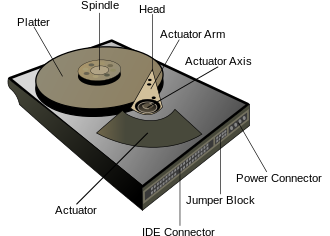
HDD has a circular disk which is made up of magnetic field sensitive film, and a magnetic head attached with arm. Speed of writing and reading depends on the motor attached to the disk for rotation and time taken to positioning the magnetic head at desirable place on circular disk. In sequential read and write operation head does not need to move once it is located on desirable place so in this case only rotation per minute (RPM) of motor will decide the speed of read/write operations. Re positioning mechanism has to deal with inertia and accuracy of position so its the slowest sub operation in hard disks. Physical movements has to deal with physics’s law so even after optimization there is a upper limit which cant be crossed with any technology.
Solid State Drive
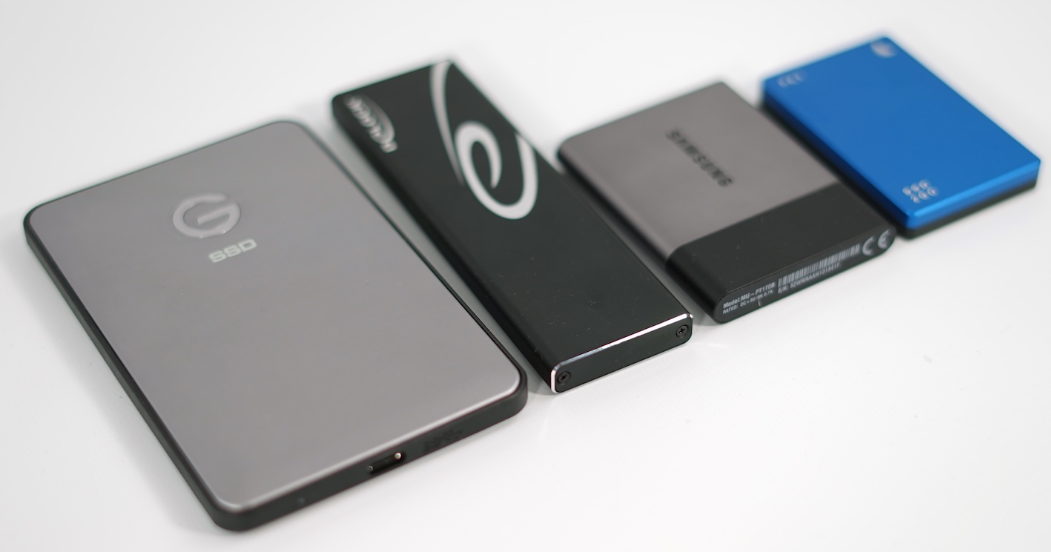
These drives uses non volatile integrated circuits to store data. There is no need of physical movement in such drives so these are much faster than HDD especially for random access.
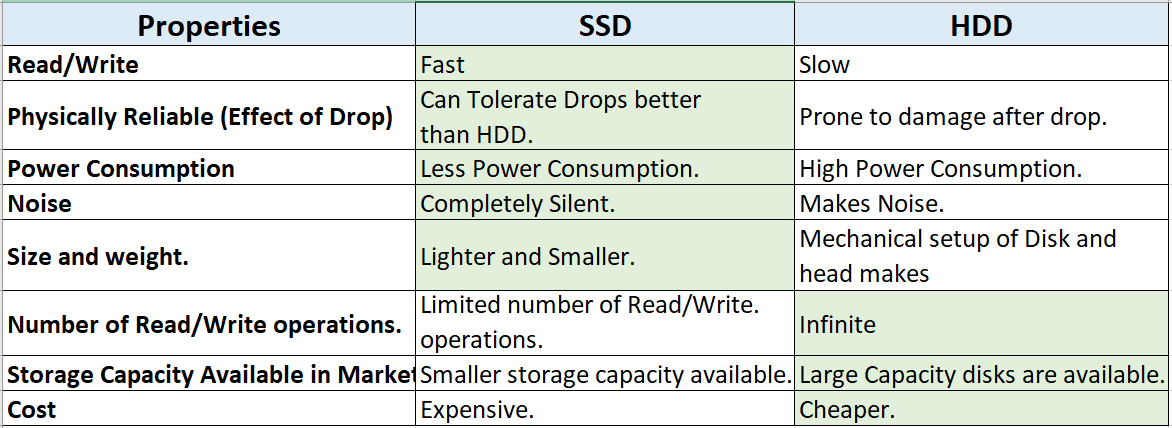
Comparison SSD vs HDD
Analysis With RAM size and SSD & HDD.
When you start anything in your computer it will be loaded from secondary storage to main memory Partially. So if RAM size is small and software or game requires lot of RAM then there will so many
Page Faults (
Memory Transfer from secondary storage to RAM) it will heavily downgrade the overall performance. This is applicable only for big games and software like Virtual Box etc or in case of many things running simultaneously. Time taken for serving page faults is dependent on the secondary memory HDD or SSD.
SSD are faster but real bottleneck is RAM size because to improve overall performance we need to reduce the number of page faults instead of improving page fault service time. There is very huge gap in speed of RAM and secondary memory so improving secondary memory speed by replacing HDD with SSD is not going to help in case of less RAM size.
First time loading or boot is always will be dependent on secondary memory speed even you have infinite RAM size, because you can not store anything in RAM permanently.
1. Less RAM + HDD: will suffer from page faults, will have poor performance.
2. Less RAM + SSD: nothing is going to change, speed of secondary can not overcome shortage of RAM because of very huge difference between operating speed of primary and secondary memory.
3. Enough RAM size + HDD: will only suffer significantly at the time of first time loading. Recommended for budget buyers.
4. Enough RAM size + SSD: This combination will give best speed because of less page faults and Fast page fault handling. Recommended for those who need speed but do not need much space in system.
5. Enough RAM size + small SSD + HDD. This combination picks best feature from all, best speed and big space. Recommended for Gamers and Graphic and Video Editors.
Conclusion
If you want to upgrade your system with SSD to improve the speed. Please first make sure that you have sufficient RAM according to your requirements.
You can opt for smaller SSD to replace HDD in your system with one external HDD for large storage if you want to spend wisely. You can not install both drives inside your laptop and hybrid drives are not popular because of complications. So either go for SSD + external HDD or buy new laptop with SSD + HDD.
If you want speed and do not need large storage space, replace HDD with SSD.
If money does not concerns you in making the choice then obviously go for SSDs but still for large external storage you have to purchase HDD.
For normal general user SSD is luxury not necessity so identify your requirements and then make decision.
Which Storage suits you.
SSDs
1. Gamer
Fast Game loading, Fast Game reloading in case of player dies or Fast travel in open world games.
2. Graphic Designer, Video editor.
3. Professionals who prefer speed over price and space size.
4. Music professionals who cant tolerate any kind of noise while recording.
5. Who hates slow boot up of Operating System.
HDDs
1. Gamer: Mandatory requirement to store bulky games collection.
2. Graphic Designer, Video editor: Required to store bulky video collection.
3. General User.
4. Budget Buyer.
Advice
If you play games regularly and use fast travel in open world games, or dies often, SSD will save your more than half of loading time.

 buddhaTech